Designing Your Form in Word
PDF forms present some of the most complex accessibility challenges in document work. Unlike other document content, forms require not just correct tag structure but also properly labeled interactive fields, logical navigation order, and field types that accurately communicate their function to assistive technology.
This page covers the full form accessibility workflow — from designing the source document in Word so that Acrobat's form detection tool works correctly, through the steps required to make the resulting form accessible. Also see Authoring Accessible Content for any elements in your document not related to form fields.
Before You Begin: Consider the Alternatives
Before building a PDF form, consider whether an online form would better serve your audience. Microsoft Forms — available through our Microsoft tenant — provides accessible forms with less manual effort, automatic data collection, and mobile-friendly layouts that PDF forms cannot match.
The Web Development team can assist with creating Microsoft Forms. Contact them before beginning a complex PDF form project to determine whether a digital form is appropriate for your use case.
When Microsoft Forms is not appropriate:
- The form requires a wet signature
- The form must be completed offline
- Legal or regulatory requirements mandate a specific fixed format
- The form collects data that cannot be hosted outside specific approved systems
PII and security: Forms that collect personally identifiable information (PII) must be restricted to authenticated users within the WVDE Microsoft tenant — Microsoft Forms includes a setting that limits responses to users with an active account in our organization.
Form vendors or platforms that have not been approved for use by WVDE should not be used to collect sensitive or personally identifiable information under any circumstances.
Designing the Word Document for Form Detection
When you export a Word document to PDF and run Acrobat's Prepare Form tool, Acrobat scans the document for visual cues that indicate where form fields should be placed. The tool identifies field types based on what it sees on the page. Designing your Word document with these visual conventions in mind dramatically improves detection accuracy and reduces the manual work required after auto-detection runs.
Visual Conventions the Prepare Form Tool Recognizes
Text entry fields — indicate with a horizontal rule or underline near the label. The tool uses this visual cue to place a single-line text field at that location.
Text areas (multi-line fields) — indicate with a rectangular box with a visible border. A clearly drawn rectangle signals that a larger, multi-line input area is expected.
Checkboxes — indicate with a small square. The tool recognizes squares as checkboxes and will place checkbox fields at those locations.
Radio buttons — indicate with a small circle. The tool recognizes circles as radio buttons. Note that if your design uses squares for both checkboxes and radio buttons (a common visual preference), the tool will create checkbox fields for all of them — the incorrectly detected checkbox fields will need to be deleted and replaced with radio button fields manually.
There is no conversion option; replacement is required. The better approach is to style the indicators correctly in the Word document before export — circles for radio buttons, squares for checkboxes — so the Prepare Form tool detects the correct field type from the start. See the Checkbox vs. Radio Buttons section on Creating Form Fields in Acrobat.
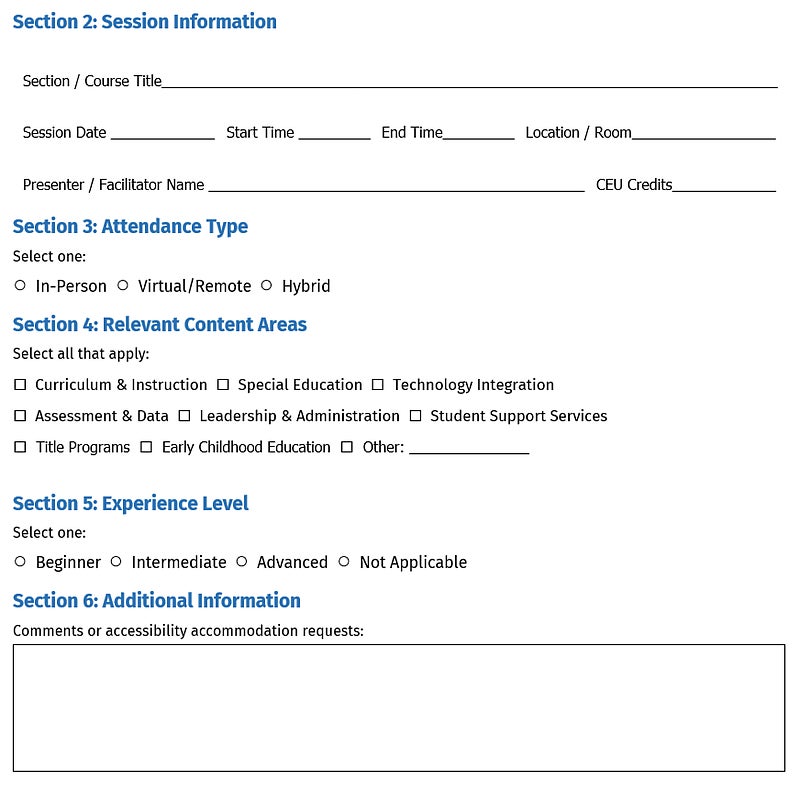
Download an example Word file with form field visual cues (not intended to be used as a template)
Label Placement
Place labels clearly adjacent to their corresponding field indicator. The Prepare Form tool uses label text proximity to assign accessible names to detected fields. Labels that are ambiguous, distant, or formatted in a way that breaks their visual relationship to the field may result in incorrect or missing accessible names after detection.
For tables with repeated rows — such as a form collecting multiple employer entries — ensure each row has a consistent label structure. See the Field Labels and Accessible Names section below for how to name fields in repeated rows correctly.
Format Instructions in Labels
If a field requires a specific input format, include the format guidance in the label itself. For example:
- "Date of Birth (MM/DD/YYYY)"
- "Phone Number (include area code)"
- "ZIP Code (5 digits)"
This gives both sighted users and screen reader users the format information before they enter the field, rather than relying on validation errors after submission.
Format guidance can also be included in the field's tooltip — this is particularly useful when keeping the visible label concise while still providing detailed format instructions to screen reader users.
Form Field Validation
Acrobat allows you to configure field-level validation — for example, requiring a phone number to match a specific format before the form can be submitted. If you use validation, be aware that validation error messages may not be reliably announced by screen readers. Clear label and tooltip guidance is always the more dependable approach, and should be in place whether or not validation is also configured.
Example Files
- Poor Form Layout Example [Word]
- Poor Form Layout Example [PDF]
- Good Form Layout Example [Word] - starting position to create an accessible fillable form
- Good Form Layout Example [PDF]
- Form file (Poor layout) [PDF]
- Form File (Good Layout) [PDF]
- Completed Form File (Based on Good layout) [PDF]
Check the rest of your document
The form is only part of the file. Before you export, make sure everything around it is built accessibly.
Document Settiings
Set the title, language, and other settings that carry through to the PDF.
Headings
Use Word's built-in heading styles to create a structure screen readers can navigate.
Reading Order
Understand how layout choices in Word affect the sequence in which screen readers encounter your content, including each label before its field.
Creating Accessible Tables
Structure data tables correctly, and know when a table is the wrong tool for form layout.
Next: Export your form to PDF
Once your labels and visual field indicators are in place, export the document to PDF so you can add the form fields in Acrobat.